The Apple Watch is a nice little device, and it’s known to have motivated even lazy people into taking better care of themselves through the “gamification” of exercise.
However, it can happen that the Workout app doesn’t properly track exercise minutes (and, to a lesser extent, burned calories), and while Apple provides an official checklist for improving workout calibration, sometimes the issues persist.
TL;DR: If you wear the Watch low on your arm, move it higher. Seriously, that fixed it for me.
One very peculiar problem I had myself was that indoor walking workouts were not always being recorded properly: calories mostly worked, but I could walk half an hour and yet only a few minutes would be recorded as exercise, even if I walked fast. (Yes, I do walk around he house when it’s too cold to do so outside; a book or a friend on the phone are great reasons not to sit still!)
The weirdest thing was outdoor workouts generally worked much better, and rebooting the watch usually fixed the indoor workout problem… for a while anyway, which ruled out a hardware problem. Recalibrating fitness data didn’t seem to help in the long term either. Definitely annoying.
I knew that Apple Watch calculates exercise by applying some sort of “mathemagics” (did I actually write that?) to sensor data, especially the heart rate monitor and the accelerometers, so I started going through the heart rate graphs of my indoor walking workouts, and I stumbled upon stuff like this:
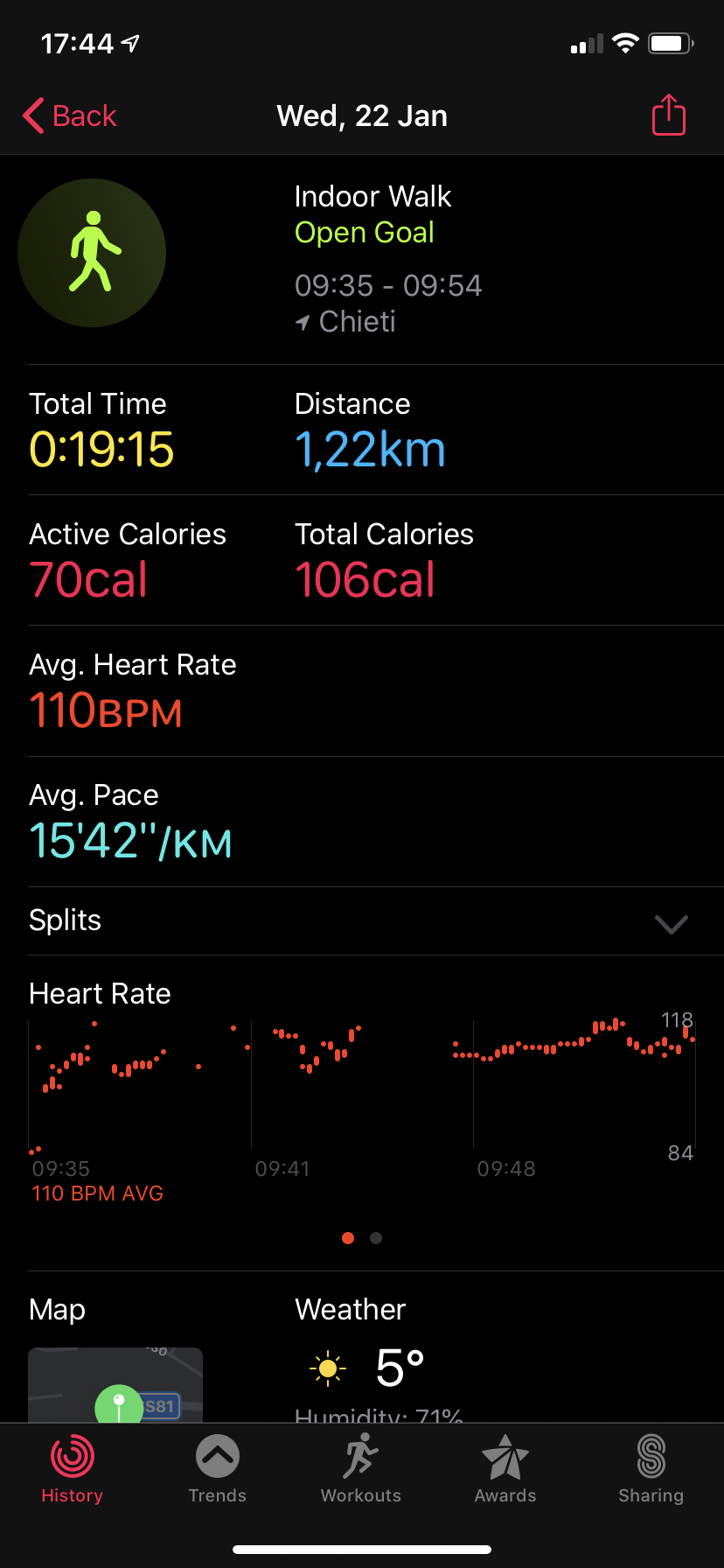
Notice how there are considerable gaps in the heart rate graph, especially considering the time scale at the bottom. That made me think: I do keep the Watch “not too tight, not too loose” as per instructions (and, honestly, as per comfort) so I knew that was not the issue. I also have zero tattoos, and while I do sport a little hair on my arms, I’m definitely not furry. Yet something was occasionally preventing the Watch from recording my rate, and I was determined to figure out what it was.
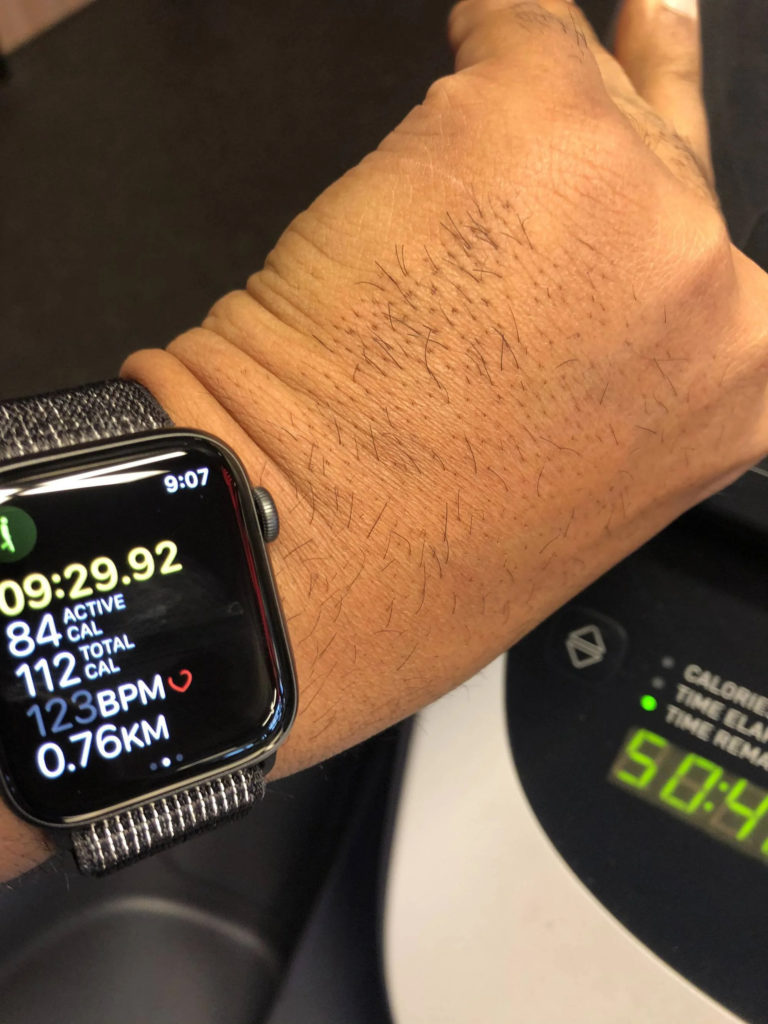
In the coming days I started paying attention at the monitor: at a glance it worked just fine, however a pattern started to emerge as I looked more closely. I noticed that whenever I brought the watch up and screen turned on — I have a Series 4 so the screen is not always off — the heart icon was not solid, but rather just showed an outline. Only after a second or so did it become solid and started pulsating, while the number itself started updating again. That was consistent with the lack of recording, but why? Was it some kind of bug in the software that put the heart rate monitor into sleep mode when the screen was off? Yet the green lights at the bottom worked just fine. That couldn’t be it.
At this point, I must confess, I was a little disheartened — pun fully intended. A few months ago I had had another issue with the heart rate monitor in my Watch, and in that case it was indeed a nasty software bug: for some reason, it just wouldn’t update the label in the Workout app. It was perfectly functional in the Heart Rate app, and the graphs were perfect. Just the Workout app, during the workout itself, wouldn’t let me know how my heart was doing. No amounts of reboots helped and I ultimately had to unpair the Watch and re-pair it again. Thankfully a restore from backup didn’t carry the bug over, so it was just a matter of wasting some time.
This was different, though. It worked fine, just not always. And looking at the screen would always fix it. I felt like Bilbo playing riddles with Sméagol, until it dawned on me: what if I’m wearing it wrong? Not in terms of how tight the strap was, rather where on my arm the watch was. So I did what a man of science would do: run an experiment.
I normally wear the Watch quite low on my wrist, quite close to the hand. It’s actually comfortable for me, but I thought it might indeed interfere with the readings, especially if my wrist is bent inwards. So I moved the Watch a little higher, away from the hand, and off I went. Lo and behold, it worked perfectly, and so far it has kept working perfectly for over a week: I just move it a little higher before starting a walk, and bring it back to where it’s more comfortable for everyday use later on. Also, it looks like this simple fix has made the Workout app more sensitive even for other kinds of workouts: now my full Outdoor Walk Workout is recorded (except when I stop because my dog goes forensics on some blades of grass), whereas before it would often only records the minutes I spent walking uphill, burning more energy. I had assumed it was due to the Watch “learning” what was more or less straining for me, but it turns out it just didn’t have a good view of my veins.
What is weird about this is that a reboot did seem to temporarily fix the problem. I wouldn’t be surprised if there was something in the software that sort of adapts to compensate for different readings over time, even though in my case it was actually causing problems. Still, moving the Watch seems to have fixed it for good. I noticed that I still get the outline heart occasionally, but that stays on screen for a shorter time and sensor data is recorded just fine; perhaps that’s just a way for watchOS to avoid refreshing the display framebuffer until it’s actually needed to be shown on screen, though it also seems to happen with the always-on Series 5.
Does anyone want to, ahem, chime in?